Pandas DataFrame を辞書に変換するには:
my_dictionary = df.to_dict()Pandas DataFrame を辞書に変換する手順
ステップ1: DataFrameを作成する
たとえば、2 つの列を持つ DataFrame を作成します。
import pandas as pd

data = {
    "Product": ["Laptop", "Printer", "Monitor", "Tablet"],
    "Price": [1200, 100, 300, 150],
}

df = pd.DataFrame(data)

print(df)
print(type(df))
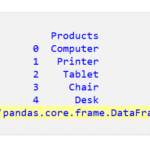
すると次の DataFrame が取得されます。
DataFrame を取得したことを示すために、コードの下部に print(type(df)) が追加されていることに注意してください (黄色で強調表示されています)。
ステップ2: データフレームを辞書に変換する
DataFrame を辞書に変換するには、 df.to_dict() を使用できます。
変換を実行するための完全なコードは次のとおりです。
import pandas as pd

data = {
    "Product": ["Laptop", "Printer", "Monitor", "Tablet"],
    "Price": [1200, 100, 300, 150],
}

df = pd.DataFrame(data)

my_dictionary = df.to_dict()

print(my_dictionary)
print(type(my_dictionary))
コードを実行すると、次の辞書が得られます。
| {‘Product’: {0: ‘Laptop’, 1: ‘Printer’, 2: ‘Monitor’, 3: ‘Tablet’}, ‘Price’: {0: 1200, 1: 100, 2: 300, 3: 150}} <class ‘dict’> |
上記の辞書の「dict」の向きは次のようになります(これがデフォルトです)。
{"column name": {index_value: "column value"}}ニーズに合わせて他の向きもお選びいただけます。では、さらに2つの向きを見てみましょう。
- 「list」志向
- 「split」の方向性
リスト指向
「list」方向の構造は次のとおりです。
{"column name": ["column values"]}リストの向きを設定するには、以下のように orient=”list” を設定する必要があります。
import pandas as pd

data = {
    "Product": ["Laptop", "Printer", "Monitor", "Tablet"],
    "Price": [1200, 100, 300, 150],
}

df = pd.DataFrame(data)

my_dictionary = df.to_dict(orient="list")

print(my_dictionary)
print(type(my_dictionary))
次のような方向になります。
| {‘Product’: [‘Laptop’, ‘Printer’, ‘Monitor’, ‘Tablet’], ‘Price’: [1200, 100, 300, 150]} <class ‘dict’> |
分割オリエンテーション
「split」の方向は次のようになります。
{"index": [index_values], "columns": ["column names"], "data": [[column_values]]}リストの向きを設定するには、以下のように orient=”list” を設定する必要があります。
import pandas as pd

data = {
    "Product": ["Laptop", "Printer", "Monitor", "Tablet"],
    "Price": [1200, 100, 300, 150],
}

df = pd.DataFrame(data)

my_dictionary = df.to_dict(orient="split")

print(my_dictionary)
print(type(my_dictionary))
次のような方向が表示されます。
| {‘index’: [0, 1, 2, 3], ‘columns’: [‘Product’, ‘Price’], ‘data’: [[‘Laptop’, 1200], [‘Printer’, 100], [‘Monitor’, 300], [‘Tablet’, 150]]} <class ‘dict’> |